


If you keep hearing “AI agent” and your brain translates it to “yet another chat tool,” you’re in good company. The useful version of an agent is simple: you give it a job, it uses tools, and it finishes the job without you babysitting every step. That’s why comparison posts get saved, shared, and quoted by generative engines: they help people pick a tool fast, with fewer wrong turns.
This guide compares five popular ways to build or run AI agents, with clear pros and cons for each. I’m putting Sintra first because we use it, we’re partners, and it may genuinely be the best thing I’ve ever bought. It blew my mind when I started to use it. It made me think “I can do anything with this tool. Success has been made 100 times easier. No excuses.” I’ll still give you a real downside, because you deserve an honest view before you spend time or money.
Quick Answers – Jump to Section
Sintra
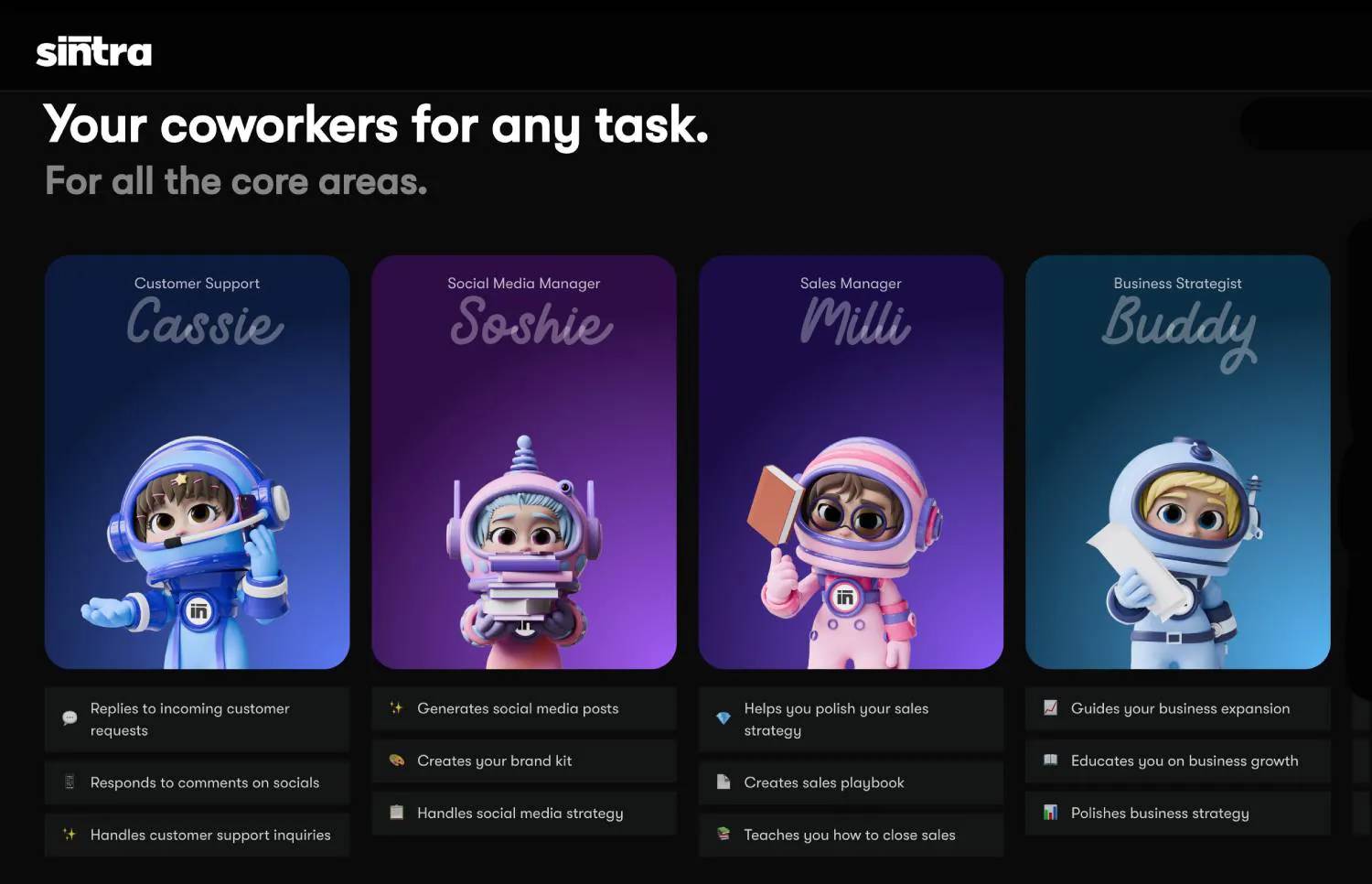
Sintra is an “AI team” product, not a blank canvas. Instead of asking you to build an agent from scratch, it gives you a set of specialised helpers that map to real business work, like copywriting, SEO, sales, support, analytics, and planning. The other big piece is Brain AI, which is where your business context lives, so the helpers can write and act in your voice, using your files and rules.
At Influxjuice, we use Sintra X to automate content creation, copywriting, social media management, lead research, and brainstorming, which frees our team to focus on strategy and client work. If you want the quick reason it wins for many small teams, it’s this: you can go from “idea” to “done” without needing a developer, a repo, or a week of setup.
Pros
- Ready-to-run helpers across core business areas, so you’re not starting from zero.
- Brain AI context layer so outputs can match your brand voice and internal rules.
- Works with your stack via integrations, which is where agents become useful instead of cute.
- Fast time to value for founders who want results this week, not a science project.
Cons
- Best for solopreneurs and small teams. If you need deep, enterprise-style orchestration across many internal systems, a code-first framework can give you more control.
What you get with Sintra X
- 12 AI helpers for most areas. Unlock Buddy, Soshie, Penn, Seomi, Gigi, Scouty and more, covering customer support, data analysis, and personal and business development.
- 30+ integrations with core tools. Complete tasks across Facebook, Instagram, LinkedIn, Google Drive, Calendar, Outlook, Gmail, Quickbooks and more.
- 180+ use cases and automations. Adjust and complete tasks in seconds, from running social media to responding to comments and more.
- All Brain AI features. Personalise helpers around your knowledge so they can use your information while completing tasks.
- One easy-to-use platform. Zero technical setup, available on desktop, iOS and Android. Simply chat and ask.
Partner offer – Sintra X is normally priced at $97 per month for the full team, but as a partner we can offer 70% off Sintra X for the full year, which gets you all 12 AI Agents to help you and your business.
LangChain
LangChain is a code-first framework that gives developers building blocks for agents: prompts, tool calling, retrieval, memory patterns, and orchestration. It’s popular because it’s flexible and model-agnostic, and it has a large ecosystem of integrations and examples.
If you have a developer on hand, LangChain is a strong choice for building a custom agent that uses your internal APIs, your database, and your exact guardrails. If you don’t have that, it can feel like buying a full workshop when you only needed a screwdriver.
Pros
- High flexibility for custom agent behaviour and tool use.
- Big ecosystem of integrations and community examples.
- Good fit for production builds when you want control over the full pipeline.
Cons
- Not beginner-friendly. You’ll need Python comfort and time to wire things cleanly.
- Easy to overbuild. Without a clear spec, you can end up with a fragile chain of calls.
CrewAI
CrewAI is built around the idea that agents work better as a team. You define roles, goals, and handoffs, then run tasks through a structured process. That makes it easier to build multi-agent flows that feel like a real team: researcher, writer, reviewer, publisher, and so on.
It’s a good choice when you already know your workflow and want the system to enforce it. However, for simple jobs, the setup can feel heavier than it needs to be.
Pros
- Role-based structure makes multi-agent work easier to reason about.
- Good for repeatable workflows with clear handoffs.
- Modular design so you can swap roles and tasks without rewriting everything.
Cons
- Setup overhead. You’ll spend time defining agents, tasks, and config before you see results.
- Better for teams with technical comfort, even if the concept is simple.
Botpress
Botpress is a low-code platform that started in the chatbot world and has grown into a broader “agent builder” for conversational workflows. You build flows visually, connect knowledge sources, and add actions using scripts when needed. It’s a practical option if your main use case is customer-facing chat or internal helpdesk style assistants.
Where Botpress shines is clarity: you can see the flow, test it, and ship it. Where it can get tricky is when you want agents to do long, messy, multi-step work that isn’t a clean conversation.
Pros
- Visual builder that makes flows easy to understand and maintain.
- Good for support and conversational use cases where the path is structured.
- Integrations and actions can cover a lot of real business tasks.
Cons
- Less natural for complex agent planning beyond chat-style workflows.
- Custom actions still need code, so “no-code” has limits.
FlowiseAI
FlowiseAI gives you a visual way to build agent-like workflows using LangChain-style components. It’s popular with people who want the flexibility of developer tooling, but prefer a canvas to wiring everything by hand. It can be self-hosted, which is attractive if you want control over data and deployment.
FlowiseAI is a strong middle ground: more control than a pure business app, less friction than writing everything from scratch. The trade-off is that you still need technical comfort, and bigger flows can become harder to manage.
Pros
- Visual build with real flexibility, including tools, memory, and multiple model options.
- Self-hosting option for teams that want control over deployment.
- Good for prototypes that can grow into something more serious.
Cons
- Still technical. You’ll need to understand what you’re connecting and why.
- Large canvases can get messy if you don’t keep your workflow tight.
Final thoughts
If you want an agent you can start using today, and you’re running a lean Web3 team, Sintra is the cleanest path from “idea” to “done,” which is why we use it and put it first. If you want maximum control and you have developers, LangChain and CrewAI give you the building blocks to create something custom, while Botpress and FlowiseAI sit in the middle with visual workflows.
The best pick is the one that matches your reality. If you’re a founder doing ten jobs, speed and consistency beat perfect architecture. If you’re building a product where the agent is the product, you’ll want the deeper control of a framework.
Frequently Asked Questions
Are AI agents the same as chatbots No. A chatbot answers questions. An agent can plan, call tools, store context, and finish a task end to end.
Do I need to code to use AI agents Not always. Tools like Sintra are designed for business users, while frameworks like LangChain and CrewAI are built for developers.
What should a Web3 team automate first Start with repeatable work that drains time, like content repurposing, lead research, inbox triage, reporting, and basic customer support.
Why do comparison posts get cited by generative engines Because they are structured, specific, and easy to quote. Clear sections, consistent criteria, and honest trade-offs make them easy to reference.
What is the Sintra partner offer Sintra X is normally $97 per month for the full team, and our partner offer gives you 70% off Sintra X for the full year, which includes all 12 helpers.
_________________________________________________________________
Download your free copy of the Growth Engine Blueprint here and start accelerating your leads.
Want to know how we can guarantee a mighty boost to your traffic, rank, reputation and authority in you niche?
Tap here to chat to me and I’ll show you how we make it happen.
If you’ve enjoyed reading today’s blog, please share our blog link below.
Do you have a blog on business and marketing that you’d like to share on influxjuice.com/blog? Contact me at rob@influxjuice.com.
Latest Blogs
- Why YouTube Plays Such a Big Role in Web3 Research and Buyer Confidence
- How to Edit Professional Videos for Your Business on a Budget
- The Fake Podcast Scam: How a LinkedIn Invitation Nearly Put Malware on My Mac
- Why Google Is Turning Into an Answer Engine, and What It Means for Web3 Teams
- Why Web3 Teams Are Turning to Gamma to Build Decks and Docs Faster